
The Australian car logbook app for iPhone
Your car’s logbook.
Vroki is being built to record your drives and let you mark each one business or private once you’ve parked. Then share a clean logbook with your accountant. First up: Australia’s 12-week ATO logbook.
Actual iPhone app screenshots from the development build, using fictional demo data.


How it works
Drive. Tick. Export.
Built so you never need to touch your phone while you’re driving.
Start a trip with one tap
Start recording before you drive. GPS measures distance while the trip is recording; end it once you have safely parked.
Business or private, when you’ve parked
Open a trip to review its odometer readings, choose business or private, and add a purpose like “Client visit” or “Site visit”.
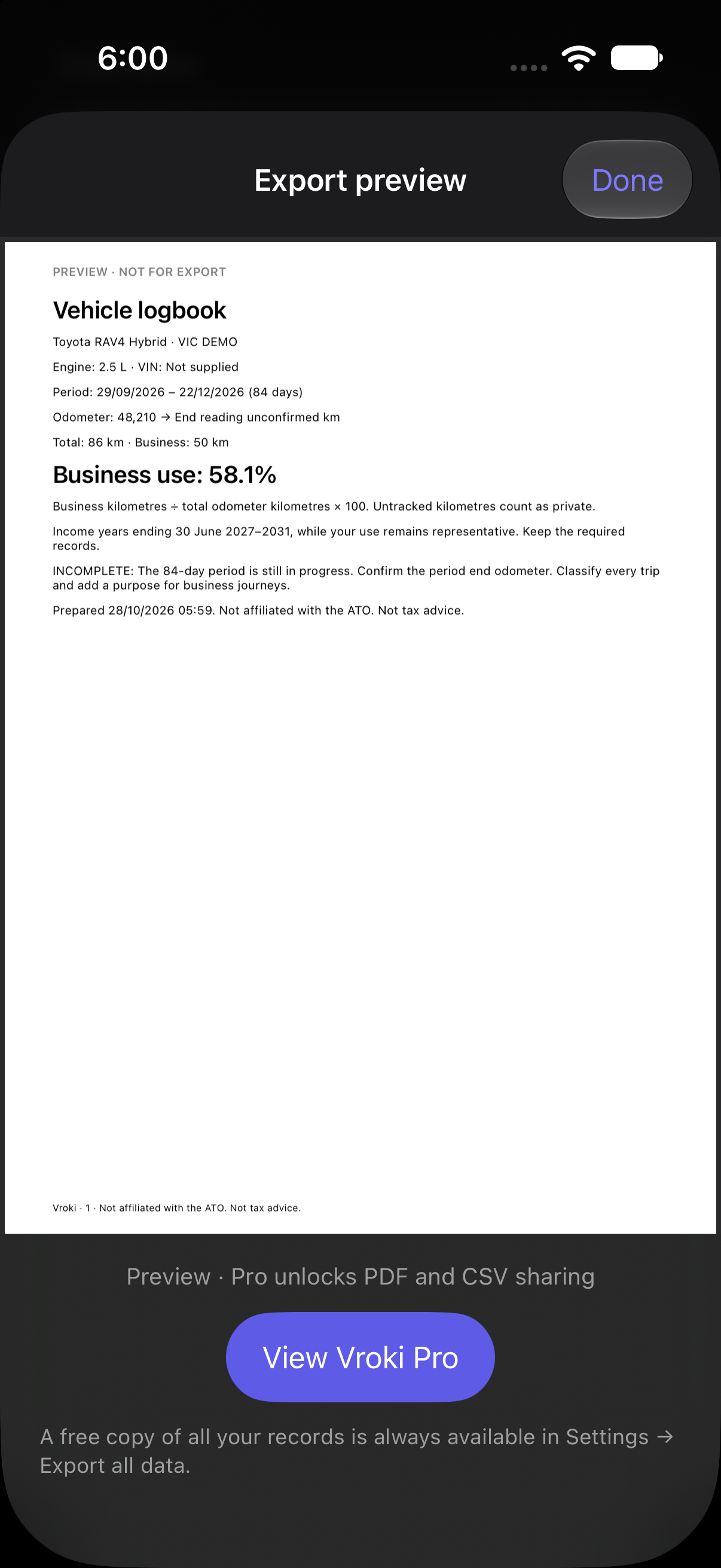
Preview your logbook
See your logbook in a PDF preview. Sharing PDF and CSV reports with your accountant is planned for Vroki Pro at launch.
One app for your car
Starts with the logbook. Grows with your car.
Version 1 does one job well: your business logbook. Rego reminders and service records are ideas for later updates, with timing still to be confirmed.
- Business logbookATO 12-week logbook in Australia firstVersion 1
- Rego renewal remindersKnow when registration is duePlanned
- Service logServices, receipts and what’s nextPlanned
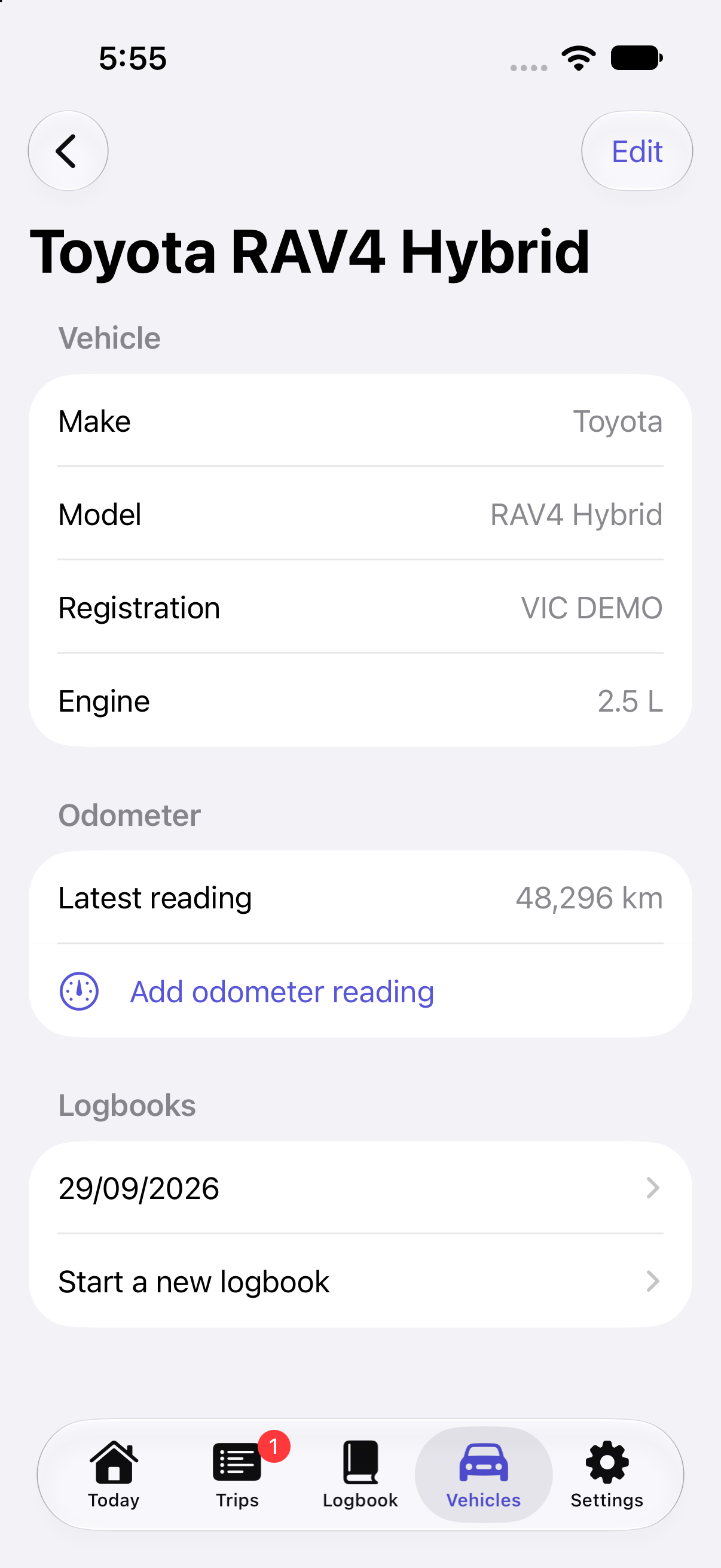
- VIN and vehicle detailsStored once, ready when you need themVersion 1
- Odometer readingsManual readings now; camera reading plannedVersion 1
Features
Everything a logbook needs.
Nothing it doesn’t.
GPS distance, only while recording
Record a route and distance when you choose to start a trip. Automatic suburb names are planned.
Siri and Shortcuts Planned
Planned voice and Shortcut actions to start and end trips, including from the Action button.
ATO 12-week logbook fields
Dates, odometer start and end, distance, purpose, the 12-week period and gap warnings.
Odometer by camera Planned
Manual odometer entry is available in the development build. Reading a photo on your iPhone, with your confirmation, is planned.
PDF and CSV export
Preview a PDF in the current build. PDF and CSV sharing are planned Pro features at launch.
Kilometres or miles
Set automatically from your region, and changeable any time in Settings.
CarPlay Planned
Big buttons on your dashboard.
Start a trip, end it, and mark it business or private from CarPlay, with no typing. Planned for an update after launch; it needs Apple’s approval first.
Where it works
Australia first. More countries next.
The first release is designed for Australian drivers. More country-specific logbooks are planned for later updates.
Pricing
Free to keep your logbook. Pro when you want more.
Record and review every trip for free. Pro adds export, auto-start and more vehicles. Subscribe for your logbook period, or pay once.
Australian pricing (AUD), GST included. Purchases will be available in the iPhone app.| Feature | Free | Pro |
|---|---|---|
| Trips, review and summary | Included | Included |
| Export logbook as PDF and CSV | Not included | Included |
| Auto-start with a Shortcuts automation | Not included | Included |
| More than one vehicle | Not included | Included |
| Export or delete all your data | Included | Included |
| No account or ads; analytics choice | Included | Included |
The App Store shows prices in your local currency. Subscriptions renew automatically unless cancelled at least 24 hours before the end of the period, in your Apple Account settings. If a subscription ends, your trips stay in the app and you can still export all your data.
Privacy in the iPhone app
Your trips stay on your iPhone.
No account
Nothing to sign up for. Open the app and start your logbook.
Your records stay local
Trip records stay on your iPhone. Optional Stactics usage analytics do not include your routes, odometer readings or vehicle details.
Location only while recording
GPS is used during a recording you start. Automatic background start is a planned feature and will require your permission.
The website and app have separate Stactics analytics controls. Read the privacy policy and manage analytics.
FAQ
Questions, answered honestly.
Is Vroki affiliated with the ATO?
No. Vroki is not affiliated with the Australian Taxation Office. Vroki is designed around the ATO’s published logbook requirements: dates, odometer readings, distances, the purpose of each business journey, and a continuous 12-week period. You’re still responsible for your records, and Vroki isn’t tax advice. Ask your accountant or registered tax agent how to claim.
What else will it do for my car?
Version 1 focuses on your business logbook, vehicle details and odometer readings. Rego renewal reminders and a service log are being considered for later updates. CarPlay is planned after launch and depends on Apple’s approval.
What happens after my 12 weeks?
Export your logbook and keep it with your tax records. If you subscribed, you can cancel in your Apple Account settings. Your trips stay in the app, and you can always export all your data.
Does it work outside Australia?
Australia is first, with ATO 12-week logbook fields. New Zealand, the US, the UK and Canada are planned. Distances show in kilometres or miles depending on your region.
Will it drain my battery?
GPS only runs while a trip is recording and stops when the trip ends.
Can it read my Apple Maps or Google Maps history?
No. Those apps don’t let other apps read your trip history, which is good for privacy. Vroki records your trips itself.
Vroki. Coming soon to iPhone.
Starting with Australia’s 12-week logbook.
Coming soon to iPhone